
maimai DX Top Score Analysis
McMai turns your synchronized play records into a top-score summary and offers related views for Best 40, AP results, play count, and friend comparisons. Before querying, update your data and select the correct region.
How to query
- Update your records using the method for your region.
- Confirm that CN, JP, or INTL is selected.
- Send
/b50; append#usernameto view another player when they allow it.
Preview
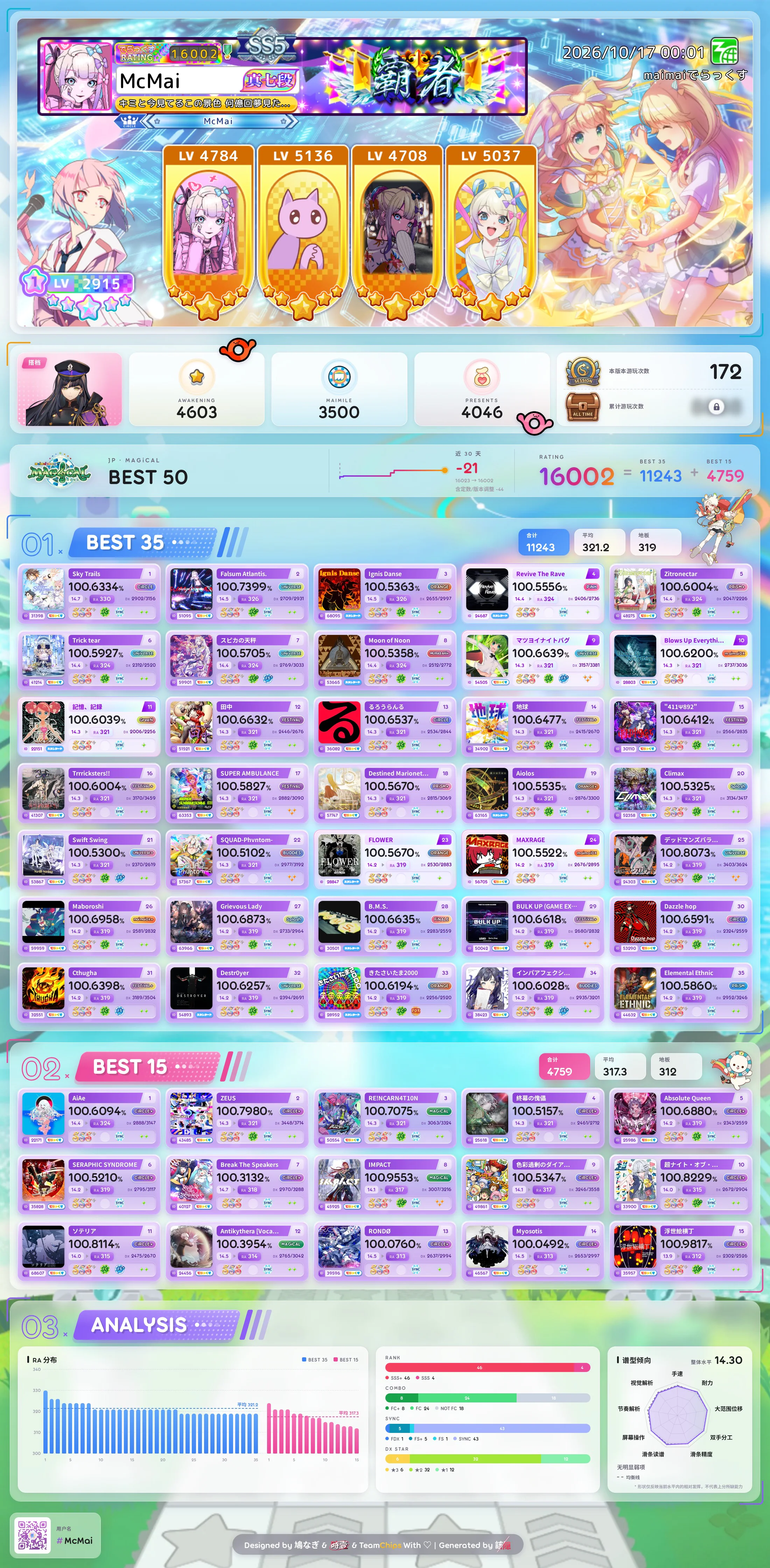
Best 50
Query your Best 50 scores (top 35 old-version charts + top 15 new-version charts).
Command: /b50
Add #username to query another player's data (requires their permission).
Examples:
| Command |
|---|
/b50 |
/b50 #SomeUser |
What the image shows
- Player info and play stats, plus your Rating distribution and grade / combo / sync / DX star breakdowns.
- Rating trend (JP / INTL only): the summary bar shows your Rating over the last 30 days. See
/ralogfor the full history. - Chart Affinity: with enough scores, the analysis panel shows a radar of your relative performance across chart types and marks your relative weak spots. See Chart Analysis & Practice. It's hidden when there aren't enough scores; send
/practicefor calibration charts.
Theoretical B50
Curious how high Rating goes if every chart were maxed? Send /b50 #intlmaxscore for the INTL theoretical B50, /b50 #jpmaxscore for JP, or /b50 #maxscore for CN. These are rebuilt automatically whenever the song database updates.
Best 40
Query your Best 40 scores (top 25 old-version charts + top 15 new-version charts).
Command: /b40
Add #username to query another player's data (requires their permission).
AP50
Query your top 50 AP / APP scores.
Command: /ap50
Add #username to query another player's data (requires their permission).
PC50
Query your top 50 most-played songs.
CN Only
This feature is only available for CN region users.
Command: /pc50
Add #username to query another player's data (requires their permission).
PK B50
Face off against another player on the charts you've both played and compare Rating.
Command: /pk50 [#username]
- Specify an opponent:
/pk50 #Sakura - No argument: randomly match a player on your server who shares at least 10 played charts with you (only from the current group when sent in a group), preferring players within 100 Rating of you
Examples:
| Command | Description |
|---|---|
/pk50 #Sakura | PK against Sakura |
/pk50 | Random match |
Rules:
- Chart set: from the charts you've both played (UTAGE excluded), the two players take turns picking their own highest-RA chart, up to 35 old-version + 15 new-version charts. Each side brings half of the set from its own strengths, so it doesn't matter who starts the PK.
- Verdict: total Rating on the chart set decides the winner; if tied, the number of charts won decides. Each chart is decided by RA first, then achievement rate if RA is equal.
- A PK can't start with fewer than 10 shared charts.
- Cross-server PK: if the two players are on different servers, each chart's constant is taken from JP, then INTL, then CN, in that order.
What the result image shows
- Both nameplates (in-game name frame, dan, and class), the score, and each player's own B50 Rating (for reference only, not used for the verdict).
- A side-by-side comparison of achievement, grade, and RA for every chart, with a per-chart RA difference chart and the chart win tally at the bottom.
- If a player hid their nickname in Profile Display Settings, it's hidden on the image too.
Update B50 Data
Sync your latest B50 data from maimai NET to local cache.
Command: /update
CN Users — Update via QR Code
CN users can use the "Player QR Code" feature from the 舞萌 | 中二 WeChat official account. Long-press the QR code, copy the SGWCMAID string, and send it to the Bot to trigger a CN B50 data update.